Sociova — Automate Instagram with clean Node.js code
Stop writing repetitive fetch calls and JSON payloads. Sociova wraps the Instagram Messaging endpoints into simple functions so you can ship faster. Works great for bots, CRMs, automations, and internal tools.
SDK-focused DX: clean methods, consistent payload shapes.
No more manual URL building, headers, and complex JSON bodies. Use straightforward methods like sendMessage(), sendAttachment(), and sendReaction().
Perfect for quick replies, support bots, lead capture flows, and CRM integrations — without rewriting request logic across projects.
Send multiple images via attachments array. Keep your message payloads consistent and predictable.
React/unreact on messages with a single call. Great for quick UX signals, confirmations, and lightweight automation feedback.
Works smoothly inside Next.js Route Handlers (app/api/*) and Node scripts — ideal for building dashboards and backend workflows.
Quickstart examples you can paste into your project. Less reading, more shipping.
Instagram API with Instagram Login
This API allows Instagram professionals (businesses & creators) to use your app to manage their Instagram presence.
- Comment moderation — Manage and reply to comments on their media
- Content publishing — Get and publish their media
- Media Insights — Get insights on their media
- Mentions — Identify media where they’ve been @mentioned by other Instagram users
- Messaging — Send and receive messages with customers or people interested in their Instagram account
This API setup does not require a Facebook Page to be linked to the Instagram professional account.
To ensure consistency between scope values and permission names, new scope values are being introduced for the Instagram API with Instagram Login.
These will replace the existing scope values business_basic, business_content_publish, business_manage_comments, business_manage_messages respectively.
The old scope values will be deprecated on January 27, 2025. Update your code before this date to avoid disruptions.
A message_id is not something you can “generate” on your own. You can only get it when your app receives an incoming event, like a comment, DM, or mention, through an established webhook connection. That incoming webhook payload includes the message_id you use for actions like react/unreact.
Quickstart
Install Sociova, add your access token to environment variables, and send your first Instagram message.
Run in terminal:
npm i sociovaAdd these variables to your environment (local or deployment).
INSTAGRAM_USER_ACCESS_TOKEN="your-access-token"
RECIPIENT_ID="the-igsid-you-want-to-message"
MESSAGE_ID="for reactions (optional)"
- Builds the correct request body for messages, attachments, stickers, and reactions.
- Adds headers (Authorization + JSON content type) automatically.
- Keeps your code readable and consistent across projects.
Example usage (copy-paste ready):
import { InstaClient } from "sociova";

const client = new InstaClient({
  auth: process.env.INSTAGRAM_USER_ACCESS_TOKEN!,
});
const getUser = await client.getUser({

    fields:"username, user_id"
})

console.log(getUser)
Send Automated Messages
// 1) Send a text message
await client.sendMessage({
  recepientId: process.env.RECIPIENT_ID!,
  message: "Hey! This was sent via Sociova SDK 🚀",
});

// 2) Send multiple images
await client.sendAttachment({
  recepientId: process.env.RECIPIENT_ID!,
  attachments: [
    { type: "image", payload: { url: "https://humkind.in/logo.png" } },
    { type: "image", payload: { url: "https://humkind.in/favicon.ico" } },
  ],
});

// 3) React to a specific message
await client.sendReaction({
  recepientId: process.env.RECIPIENT_ID!,
  messageId: process.env.MESSAGE_ID!,
  reaction: "love", // or "😊" or "🎉" or "👋"
  action: "react",  // "unreact" to remove
});Interactive Button Templates
Send interactive button templates in Instagram DMs. Perfect for lead capture, onboarding flows, support menus, and call-to-action prompts.
A button template message allows you to send a message that contains text and up to three attached buttons that allow the message recipient to choose from different options. The buttons can open web pages in the in-app browser or send the recipient's selection to you via the messaging_postback webhook notification. You can then send information about the selection back to the recipient.
- Website redirect buttons
- Postback buttons for automation logic
- Multi-option user flows inside DMs
- Structured CTA messaging
- Best CRM Architecture
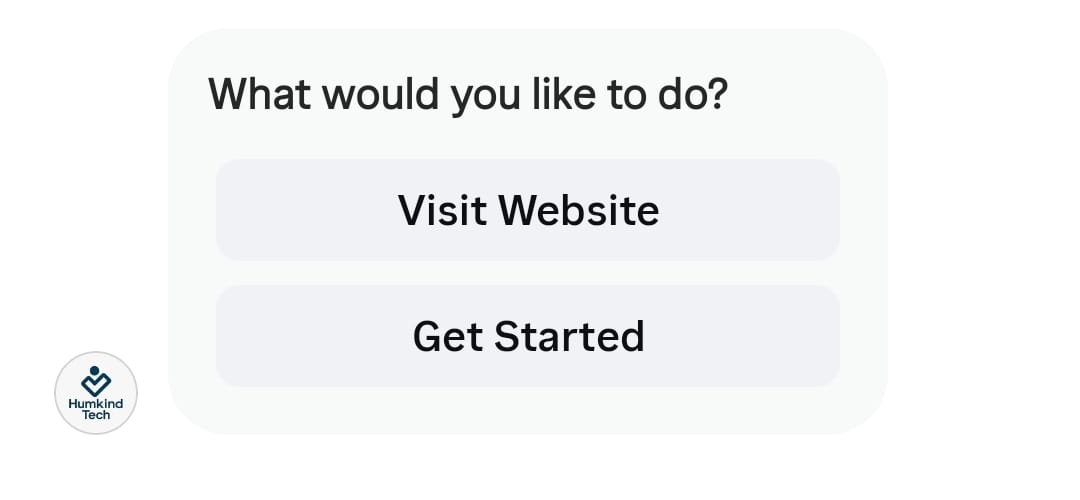
await client.sendButtonTemplate({
  recipientId: process.env.RECIPIENT_ID!,
  text: "What would you like to do?",
  buttons: [
    {
      type: "web_url",
      title: "Visit Website",
      url: "https://yourwebsite.com"
    },
    {
      type: "postback",
      title: "Start Now",
      payload: "START_FLOW"
    }
  ]
});Generic Template
Send interactive button templates in Instagram DMs. Perfect for lead capture, onboarding flows, support menus, and call-to-action prompts.
The generic template allows you to send a structured message that includes an image, text and buttons. A generic template with multiple options described in the elements array will send a horizontally scrollable carousel of items, each composed of an image, text and buttons.
- Website redirect buttons
- Postback buttons for automation logic
- Multi-option user flows inside DMs
- Structured CTA messaging
- Best CRM Architecture
- Easy Integration
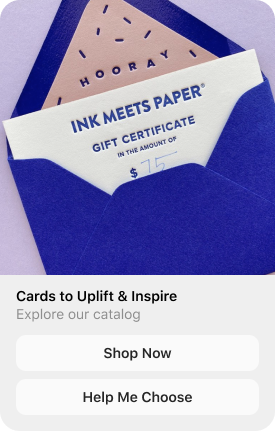
const sendGenericTemplate = await client.sendGenericTemplate({
  recipientId: process.env.RECIPIENT_ID,
  elements: [
    {
      title: "Sociova — Quick Demo",
      image_url: "https://humkind.in/favicon.ico",
      subtitle: "Send messages, buttons & templates easily",
      default_action: {
        type: "web_url",
        url: "https://humkind.in",
      },
      buttons: [
        {
          type: "web_url",
          url: "https://humkind.in",
          title: "Visit Us",
        },
        {
          type: "postback",
          title: "Start Flow",
          payload: "START_FLOW",
        },
      ],
    },
  ],
});